My tips for improving an agent-driven work environment
I ran a session on this at my team’s AI lunch. Here’s the summary.
Too many agents at once
How many agents are you running right now?
One day, I had 3 quite complex linear tickets. I created three worktrees and start running agent sessions. Some data issue was reported, so I added one more agent to analyze and debug the problem. Some model traininig was requested, so I added another agent session. Switching among multiple sessions is not free. You can tell it’s just switching tab, however, your brain can’t switch that fast. It’s not only draining, but also quality of your decision plumet.
Agents scale. Your review capacity does not.
Somewhere past two concurrent diffs, you stop reviewing and start approving. Nothing warns you when you cross that line. The output still looks like work getting done, and the pull request still gets a thumbs up.
I call this the orchestration tax. You pay it in the only currency you cannot mint more of. Opening a sixth agent does not add a sixth unit of throughput. It takes review time away from the other five.
So the ceiling is not a number I can give you. Run as many as you can verify. If you cannot say what would make you reject a diff before you open it, you are not reviewing it.
Part of that ceiling is a tooling problem. A terminal or a VS Code window is built for one session at a time. Once you go past a couple of agents, switching between them costs more than the work does, and you start approving out of navigation fatigue. A tool that shows parallel sessions at a glance genuinely raises the number you can verify. It will not make you a better reviewer, but it gives you back the time you were spending on managing.
There are couple of solutions, but Superset is my favorite. I love their minimal setup.
One session, until auto-compact?
Do you know what auto-compact means?
If you use Claude Code all day you have seen the symptoms:
- It re-reads a file it already read.
- It re-proposes the approach you killed an hour ago.
- It edits against a file state that no longer exists.
If auto-compact fired, you were already too late
Auto-compact is not a feature you use. It is the system telling you it is about to throw away detail on your behalf, and it does not ask which details you cared about. By the time you see the notice, the choice of what survives has gone to a summarizer that never saw you wince at one particular line.
Use the agent at its smartest state
Lossy summarization is only half of the problem. Long contexts are not uniformly useful in the first place.
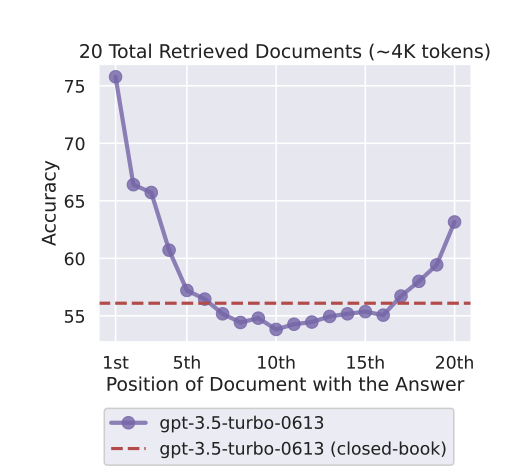
From Lost in the Middle: How Language Models Use Long Contexts.
Accuracy is highest when the answer sits at the start or the end of the context and sags in the middle. In that experiment the middle positions drop to roughly the closed-book baseline, which means the model did about as well as if you had given it nothing. Retrieving the right document into the window does not guarantee the model uses it.
Why the curve has that shape:
- The end performs well because of recency. Generated answer tokens sit closest to the final prompt tokens, and many attention patterns favour nearby information.
- The beginning performs well because of primacy. Early tokens usually carry the instructions and the framing, they influence many later representations, and they tend to get disproportionate attention.
- The middle performs worse because of competition. Relevant tokens are surrounded by distractors, they receive weaker attention, and models are not trained to use every position in a long context equally well.
A bigger window does not fix this. It just moves the sag further out.
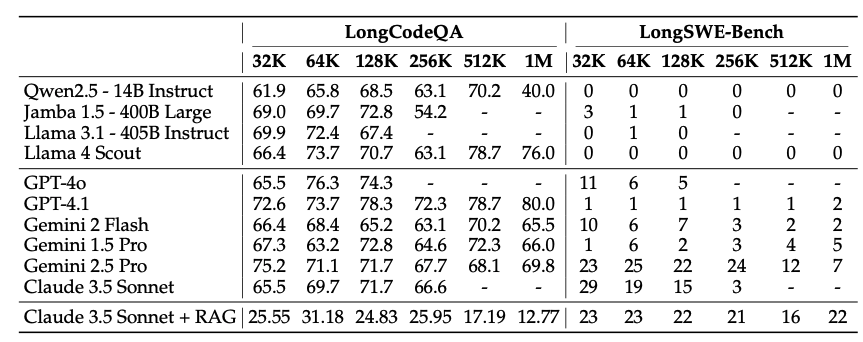
From Evaluating Coding LLMs at 1M Context Windows.
Read this one across the columns rather than down them. Scores do not climb as the window grows. On the code-editing side they sit near the floor almost everywhere, and several models peak well before their maximum context. The advertised window is a capacity limit, not a working range.
So do not use the whole 1M just because you have it. Watch your context continuously. /statusline turns it into something you can see instead of something you find out about later.
My own rule: every time a session passes 200k, I stop and decide. Either I /compact deliberately, or I hand off and /clear. What matters is that I pick what survives instead of letting the trigger pick.
Treat your context like your baby. Feed it only what it needs. And /rewind is not an emergency exit you use once a month. It is how you undo a bad turn before it contaminates everything after it.
The tokens you paid before you typed anything
Everything above is about the session you are already in. Some of your context is gone before that. Every skill you install puts a - name: description line into a listing that goes out with every turn, whether you use the skill or not. Plugins and MCP servers cost you the same way.
That listing sits at the very front of the window, which is the position the graph above says matters most. So if you have a hundred skills installed and use four, your best context is spent describing ninety-six things that will never run. The unused ones also give the agent more wrong answers to pick from.
I built context-saver because I wanted to see the number. It is a local single-file UI that shows what each skill, plugin and MCP server costs you in always-paid tokens, and lets you switch off what you do not use. You click, review the diff, and it writes ~/.claude/settings.json with a backup. You can also set a skill to name-only or user-invocable-only, so it stops advertising itself but still works when you ask for it.
Context management is the lowest hanging fruit in getting more out of an agent. It costs nothing except discipline.
Save your attention
You type “make it better”, the agent works, and then you eyeball the diff. Then you do it again on the next completion, and the one after that. Every completion bills your attention, whether the change was any good or not.
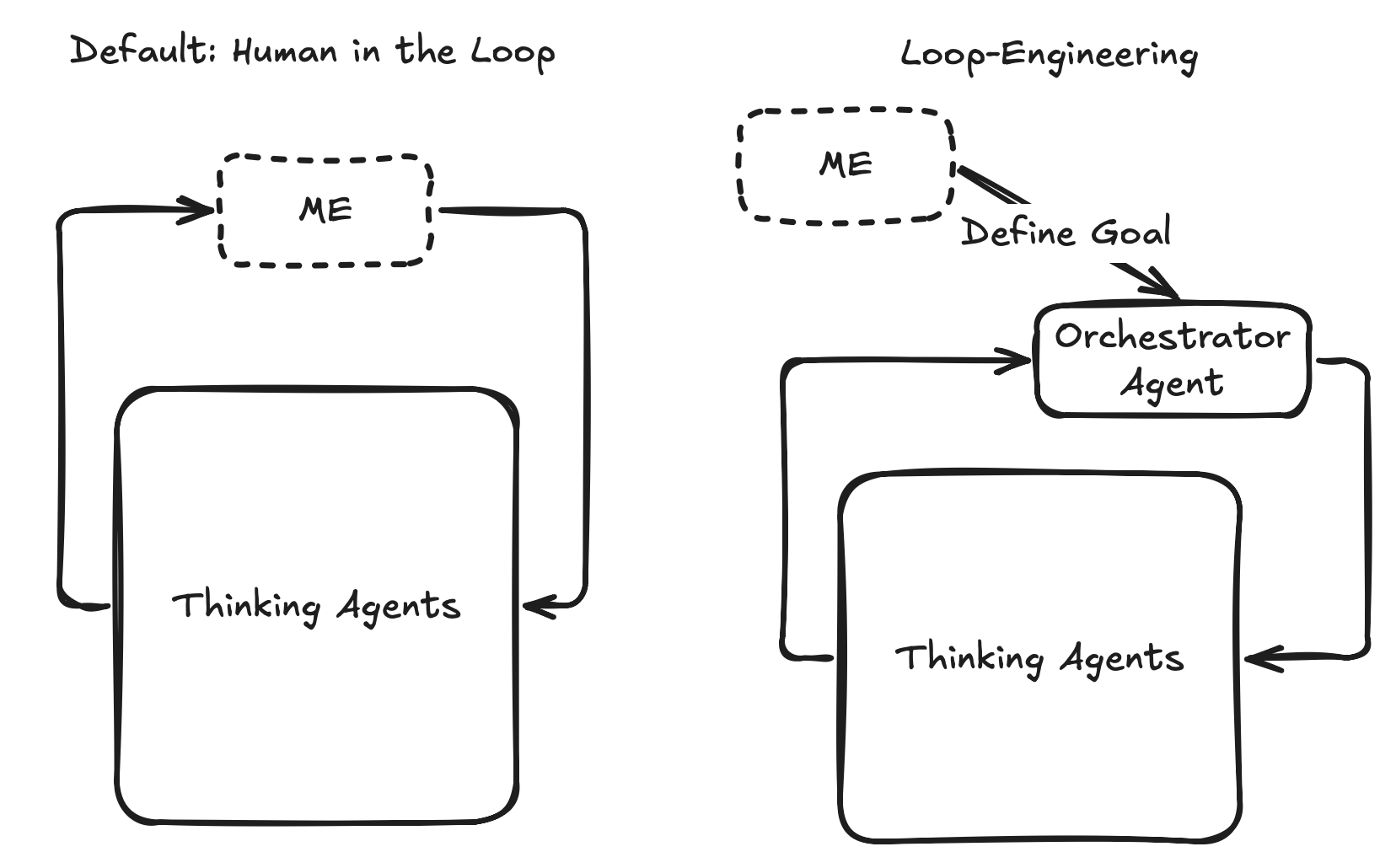
The default setup is on the left. You are inside the loop. Every iteration has to pass through you, so it can only run as fast as you can look at it, and it stops the moment you go to lunch.
Loop-engineering is on the right. You are not in the loop. You define the goal the loop runs against, and an orchestrator agent takes the seat you used to sit in. Iteration continues without you. You spend attention once, on stating the target, rather than once per completion.
That only works if the orchestrator can tell whether the goal was met, which is where the design gets interesting.
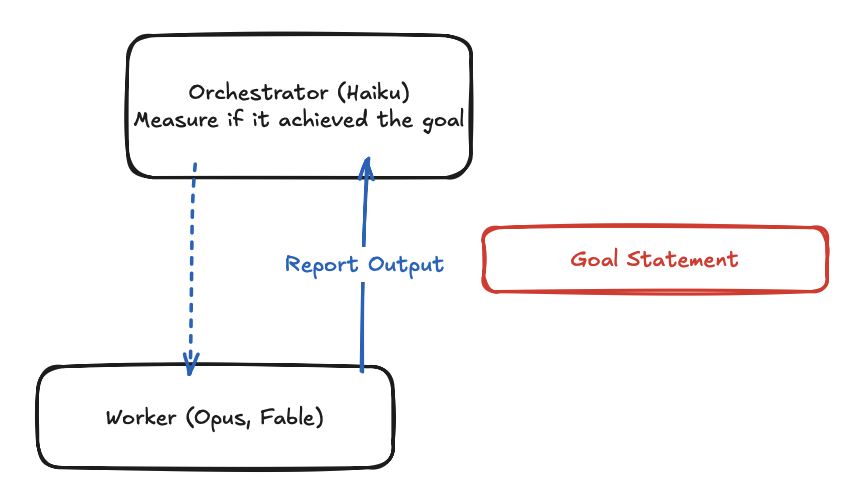
Notice the split. The orchestrator does not have to be the strongest model in the room. It dispatches work, reads the report, and checks it against the goal statement, and a cheap fast model handles that fine. The expensive models do the actual work. Checking is the easy half. Writing a goal that can be checked is the part you have to think about.
Which is why I keep the condition strict. The goal has to be measurable quantitatively, not qualitatively. Two real ones from my own work:
- MCP authentication: does it support dual mode for an admin user?
- Shopify intra-market extraction: extract every market without blowing up the row count on the dataframe merge.
Both of those have an answer a command can produce. “Make the auth cleaner” does not.
So when you write the goal, name the command that proves it, and pin down how it runs. Which interpreter, which environment, which tree. If it only passes on your machine, you have not specified a goal yet, you have described a feeling.
Where this leaves me
The three tips are really one tip. Agents are abundant and my attention is not, so everything else follows from that.
Cap concurrency at what I can verify. Curate the context before the system curates it for me. Turn measurable tasks into loops that run without me.
None of this needs a better model. It needs me to decide what done looks like before the work starts, which is the part I still get wrong more often than I would like.